Built for the big screen ยท Android TV ยท Google TV ยท Fire TV

The IPTV player your
TV deserves.

M3ufy Player turns any IPTV subscription into a beautiful, cinematic experience โ€” live TV with a full guide, movies and series with rich artwork, smart subtitles and audio, and your progress synced everywhere. Bring your own playlist.

On Fire TV or Android TV?Install the free Downloader app and enter this code: 2625887 Copied โœ“
Bring your own playlist (M3U / Xtream) ยทNo content included ยทD-pad optimized
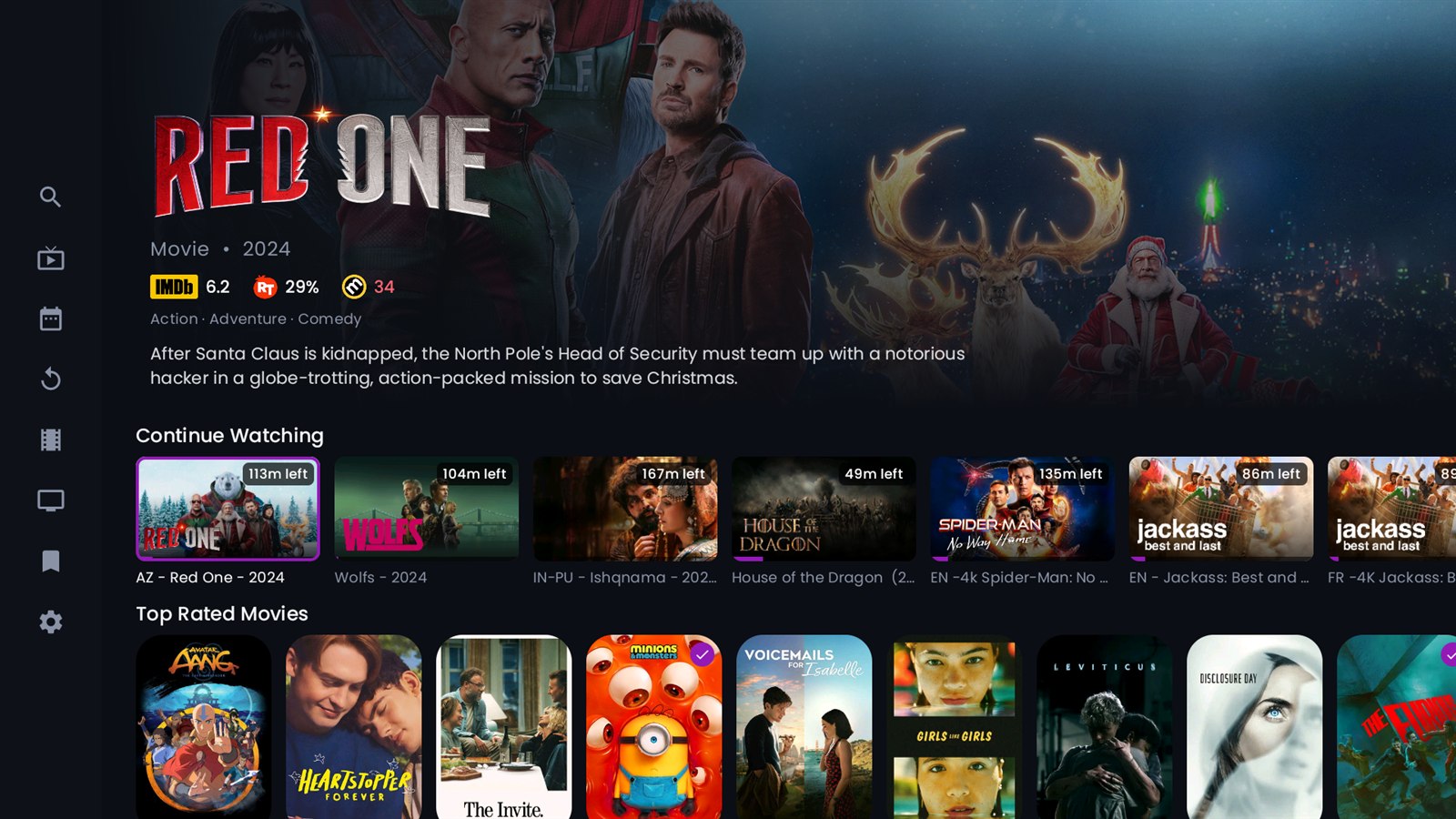
M3ufy Player home screen on Android TV โ€” a title showing its own logo, ratings and plot, with Continue Watching and rows of posters beneath
4K
HDR-ready playback
2
Playback engines
6+
Metadata sources
โˆž
Your own channels
Everything, done right

A complete streaming experience

Every part of M3ufy Player is designed for the living room โ€” fast, focus-friendly, and genuinely beautiful.

๐Ÿ“บ

Live TV & EPG

A full electronic programme guide with now/next, channel numbers, instant zapping, and a fullscreen channel list scoped to the group you entered from.

๐Ÿ—“๏ธ

Full TV Guide

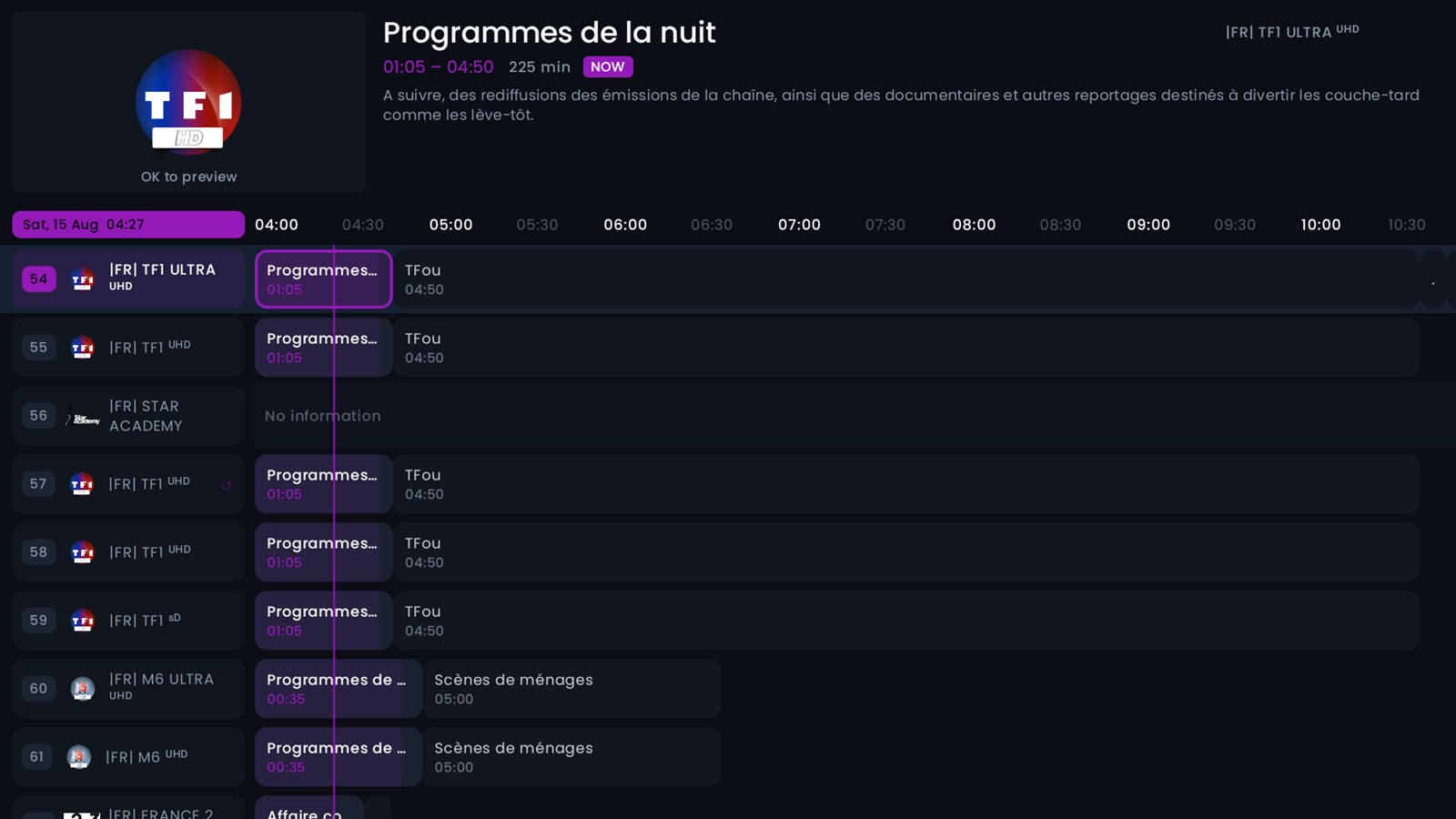
The whole schedule as a grid โ€” every channel down the side, the day across the top, and a live line marking the minute you are in. Hold a direction to fly through hundreds of channels, and press OK to watch what you land on.

โฎ๏ธ

Catch-up TV

Rewind live television. Browse a channel's archive and play any past programme, then drop straight back to live with a single press.

๐ŸŽฌ

Movies & Series

Cinematic detail pages with backdrops, title logos, cast, trailers, ratings and "more like this" โ€” pulled from multiple metadata sources.

๐Ÿ—‚๏ธ

Seasons & Episodes

Real per-episode stills, summaries, air dates and runtimes โ€” even for shows your provider left blank โ€” with watched ticks on every episode.

๐Ÿ”Ž

Universal Search

Search across live channels, movies and series at once, and jump straight into a rich detail page or playback.

โš™๏ธ

Three playback engines

ExoPlayer for everyday streams, the platform player as a fallback, and mpv โ€” which decodes the formats a television refuses, including AC-3, E-AC-3 and DTS audio. Choose one for live and another for films, or let the app switch to mpv by itself the moment a stream turns out to be one your device cannot handle.

๐Ÿ”Œ

Stalker portals

Add a MAG-style portal with the MAC address the app generates for your device โ€” live TV, films, series, guide and catch-up, alongside your Xtream and M3U playlists.

๐Ÿ“‚

Manage Groups

Hide the groups you never watch, pin the ones you always do, and reorder them โ€” your home screen, your way.

See it running

This is the app, not a mock-up

Every picture below is a screenshot from a television running M3ufy Player with an ordinary playlist. Nothing is staged, and nothing is a design that never shipped.

M3ufy Player home screen: a film shown with its own logo, ratings and plot, with Continue Watching below
A home screen that knows you Your unfinished films and episodes first, each on its own artwork, with the minutes you have left.
The TV guide: channels down the side, the schedule across the top, a line marking the current minute
The whole schedule at a glance Channels down the side, the day across the top, and a live line on the minute you are in.
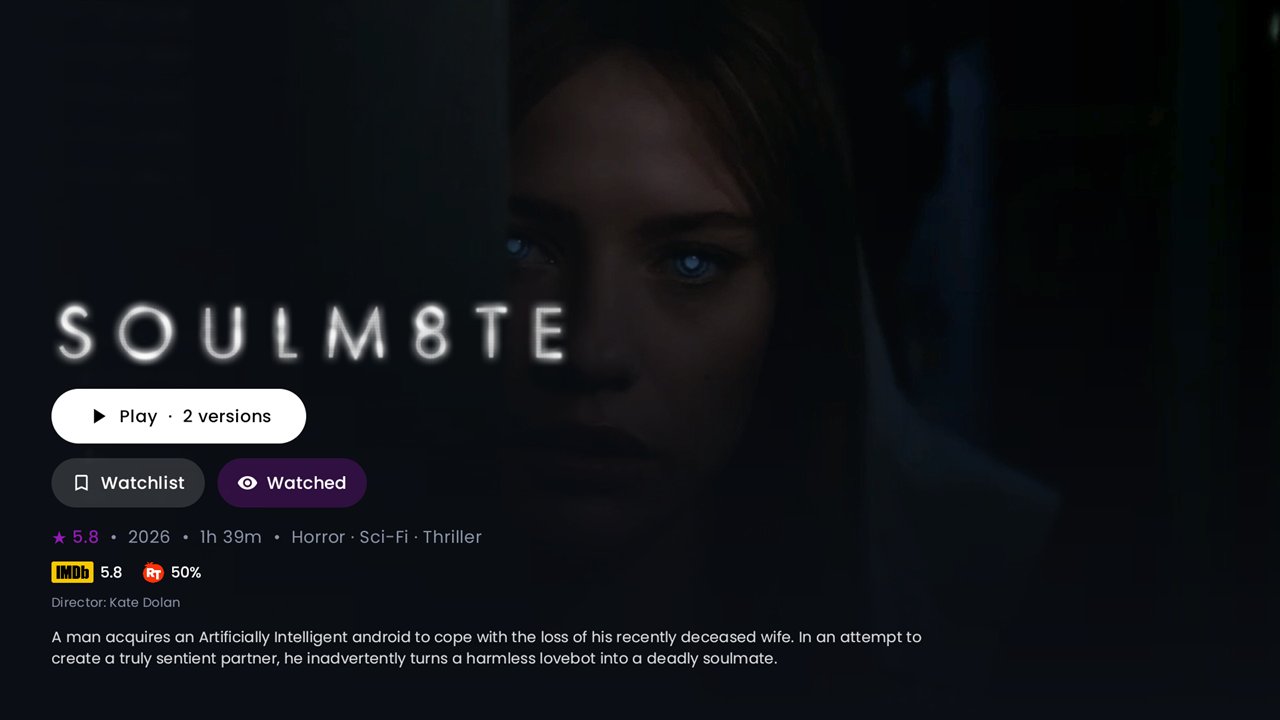
A film's detail page with its title logo, ratings from IMDb and Rotten Tomatoes, and a Play button offering two versions
Films, properly presented Title treatments, ratings from several sources, and every copy your servers hold behind one Play button.
A series detail page with title artwork, ratings, watchlist and mark-watched controls
Series that keep their place Watchlist, watched ticks and the next episode ready โ€” synced across every device you own.
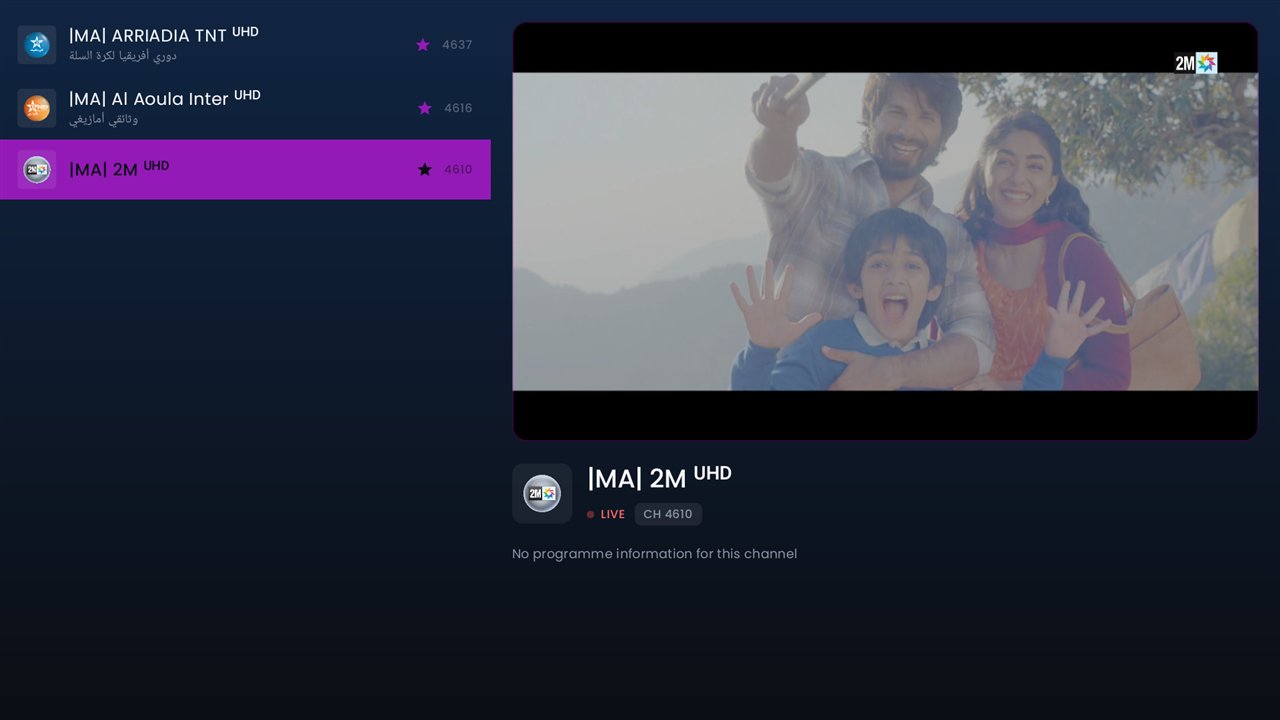
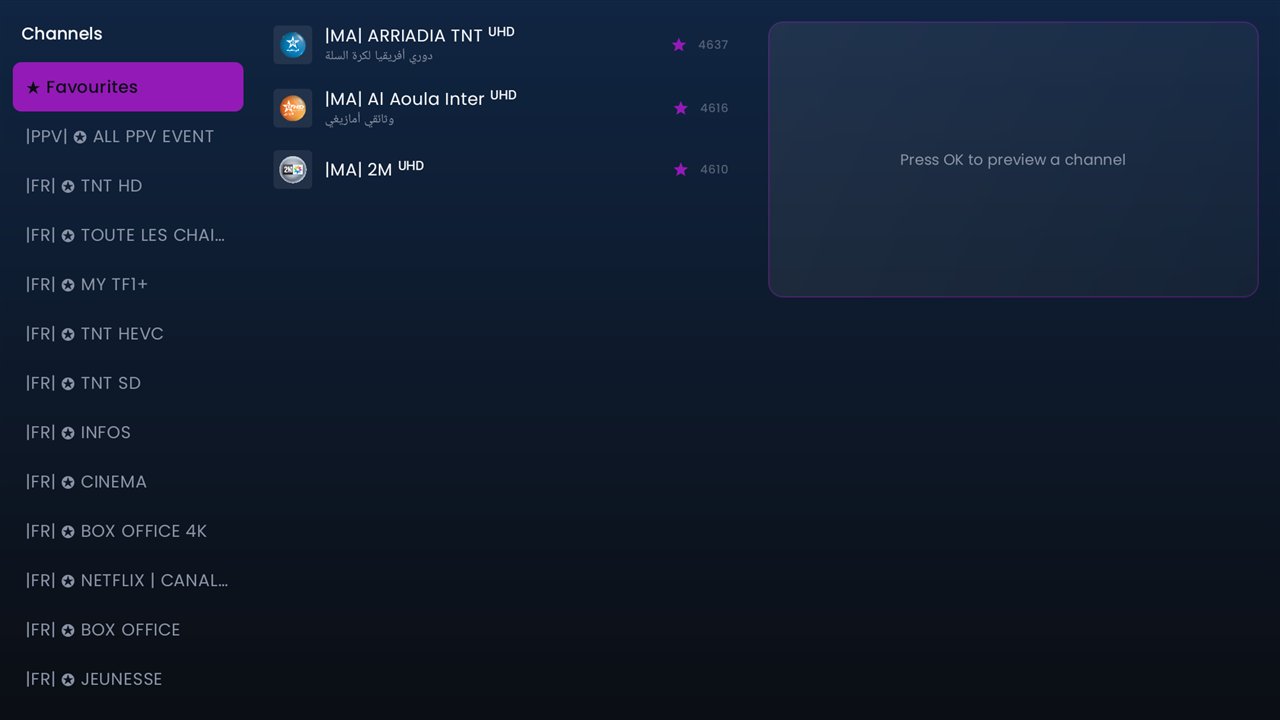
Live TV: the channel list with a channel previewing beside it
Live TV without the wait Preview a channel beside the list, then press OK again and it fills the screen โ€” no reload.
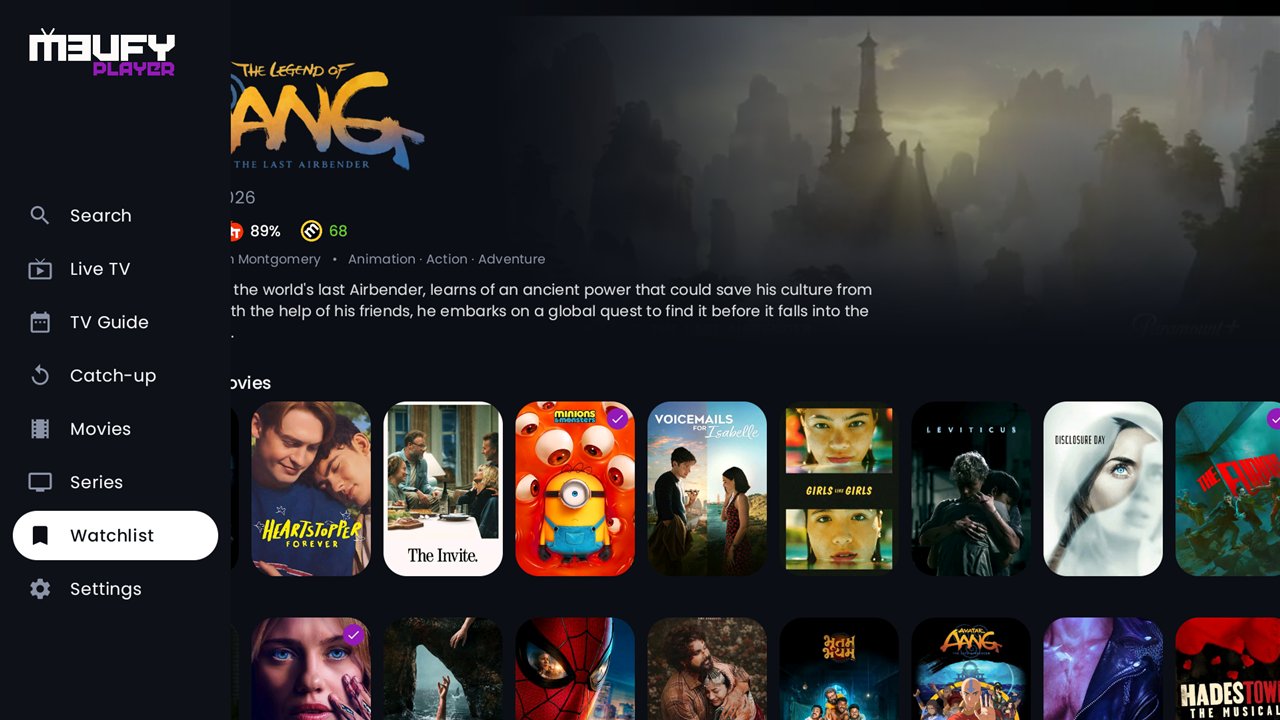
The side menu expanded over the home screen, showing Search, Live TV, TV Guide, Catch-up, Movies, Series, Watchlist and Settings
Built for a remote Everything one press from the left edge, and a D-pad that speeds up the longer you hold it.
Under the hood

Playback that just works

Two engines, professional audio decoding, and subtitles that appear before you press play.

Smart audio & subtitles, automatically

Set your languages once and every title plays the way you want โ€” no fiddling with menus.

  • โœ“ Auto audio selection by priority โ€” e.g. Original (VO) โ†’ English โ†’ French, resolving the real original language from TMDB.
  • โœ“ FFmpeg audio decoding for AC-3, E-AC-3, DTS and TrueHD โ€” clean sound on channels that were silent or crackly before.
  • โœ“ Online subtitles from SubDL & SubSource, auto-enabled in your preferred language, fetched before playback starts.
  • โœ“ Full subtitle styling โ€” size, colour, outline, position and opacity, adjustable live.
๐Ÿ”Š Original (VO)
๐ŸŽš๏ธ AC-3 ยท DTS ยท TrueHD
๐Ÿ’ฌ Auto subtitles
๐Ÿ…ฐ๏ธ Live styling
๐ŸŽฏ Language priority

Rock-solid on real hardware

Tuned for the boxes people actually own โ€” from flagship Google TV to budget Fire TV sticks.

  • โœ“ ExoPlayer with adaptive playback and hardware decoding, plus an Android player fallback for tricky streams.
  • โœ“ mpv on board โ€” when a stream uses a codec the television will not touch, the app hands it to mpv instead of showing you an error. The commonest cause of "this channel does not work" simply stops happening.
  • โœ“ 4K / HDR ready, with clear, human error messages when a provider line is down or full.
  • โœ“ Instant fullscreen โ€” the channel you're previewing simply grows, no reload.
  • โœ“ Fast startup with baseline profiles, and snappy D-pad navigation that accelerates when you hold a direction.
The M3ufy Player TV guide on Android TV โ€” channels down the side, the schedule across the top and a line marking the current minute
โ–ถ๏ธ Continue Watching
โœ… Watched badges
๐Ÿ“š Favourites
๐Ÿ” Resume anywhere

Never lose your place

M3ufy remembers what you watch and picks up exactly where you stopped.

  • โœ“ Continue Watching for movies and series, with series staying in the row until every available episode is done.
  • โœ“ Watched ticks on posters and episodes โ€” and they follow the title across every version and server.
  • โœ“ Resume across sources โ€” switch a show's version and continue from the same spot.
Trakt integration

Your watch history, everywhere

Connect your Trakt account and M3ufy keeps everything in sync โ€” across every device and app you use.

๐Ÿ”— One-tap connect (QR)
โœ… Watched history & badges
๐Ÿ“ก Automatic scrobbling
๐Ÿ” Cross-device Continue Watching
โญ Watchlist โ†’ Favourites
โš™๏ธ Per-sync on/off controls
Made yours

Personal, connected, in control

๐ŸŽจ

Themes & Appearance

Custom accent colours, fonts and poster corner styles. Make the whole interface match your taste.

๐Ÿ“ฑ

Pair with your phone

Scan a QR code to add playlists and manage your account from a phone or laptop โ€” no typing long URLs with a remote.

๐Ÿ—„๏ธ

Multiple playlists & servers

Add several IPTV sources, switch between them, and see each one's name and expiry at a glance.

โ˜๏ธ

Cloud sync

Your progress, favourites and playlists follow you to a new device or a reinstall โ€” nothing lost.

๐ŸŒ

Web dashboard

A secured web dashboard to manage devices and see what's happening โ€” your account, your control.

๐Ÿ”„

Automatic updates

Get new features the moment they ship, with a clean in-app update flow and changelog.

Also on the web

Free online IPTV tools

Prefer the browser? The original M3ufy web tools are still here โ€” no install needed.

Launch offer

1 year free โ€” first 1000 devices

We're celebrating the launch of M3ufy Player. The first 1000 devices get a full year of M3ufy free. No payment, no card โ€” install the app, then redeem with the details your TV shows you.

100 of 100 free places left
1

Install M3ufy Player on your Android TV, Google TV or Fire TV โ€” with the Downloader app, code 2625887.

2

Open Settings โ†’ About and note the MAC address and device key.

3

Enter them on this site and your free year is activated instantly.

Your account

All your TVs, one place

Create a free account and add every device you own โ€” then add playlists, check each subscription and manage them all from your phone or computer. Prefer not to sign up? You can manage a single TV with just its MAC address and device key.

Questions

Frequently asked questions

What is M3ufy Player?
M3ufy Player is a premium IPTV player for Android TV, Google TV and Fire TV. It plays live TV, movies and series from an IPTV playlist that you provide. It is a player only โ€” it does not include, host or provide any channels or content.
Does M3ufy provide any channels or content?
No. M3ufy does not host, bundle or sell any streams or content. You bring your own IPTV subscription or M3U playlist from a provider of your choosing.
How do I install it on a Fire TV?
Install the free Downloader app from the Amazon Appstore, open it and enter code 2625887 โ€” it will fetch M3ufy Player straight to your TV. The first time, Fire TV will ask you to allow installs from Downloader; that's normal for apps outside the store. On Android TV and Google TV you can use Downloader the same way, or just download from this page.
Which devices are supported?
Android TV and Google TV devices, Amazon Fire TV sticks and boxes, and Android TV boxes. The whole interface is optimized for the remote (D-pad).
What playlist formats does it support?
Standard M3U / M3U8 playlists and Xtream Codes logins (host, username and password). Most IPTV subscriptions provide one of these.
How do I add my playlist?
Enter your M3U URL or Xtream login directly on your TV, or manage everything from My Device on your phone or computer โ€” sign in with the MAC address and device key shown on your TV (no account needed) and your playlists appear on the TV automatically.
Can I sync across devices?
Yes. Continue Watching, favourites and playlists sync across your paired devices. You can also connect a Trakt account for cross-device watched history, watchlist and automatic scrobbling.
Does it support subtitles and multiple audio tracks?
Yes. Online subtitles are fetched and auto-enabled in your preferred language, and audio tracks are auto-selected by your language priority (for example Original/VO โ†’ English โ†’ French). It also includes FFmpeg audio decoding for AC-3, E-AC-3, DTS and TrueHD.
How does the free year offer work?
The first 1000 devices get a full year of M3ufy free โ€” no payment and no card. Install the app, open Settings โ†’ About on your TV to find your MAC address and device key, then redeem them on My Account. It is one per device and activates instantly. The counter on this page shows how many places are left.
What happens after the free year or the trial?
Every new device gets a 7-day free trial automatically. After that (or when a paid year ends) you renew through your provider or reseller โ€” they activate your device key. Nothing is charged automatically and no card is stored.
Is it available on the Play Store?
You can download M3ufy Player directly from this site today. It is also coming soon to Google Play.
Is my data safe?
We take privacy seriously and never sell your data. See our Privacy Policy for exactly what is collected and how it is used.

Ready for the big screen?

Download M3ufy Player, add your playlist, and enjoy IPTV the way it should look.

Or install with the Downloader app using code 2625887
Available now for Android TV, Google TV & Fire TV ยท Coming soon to Google Play ยท Bring your own IPTV subscription